
FAQ: How can I verify my identity for MFA on M365?
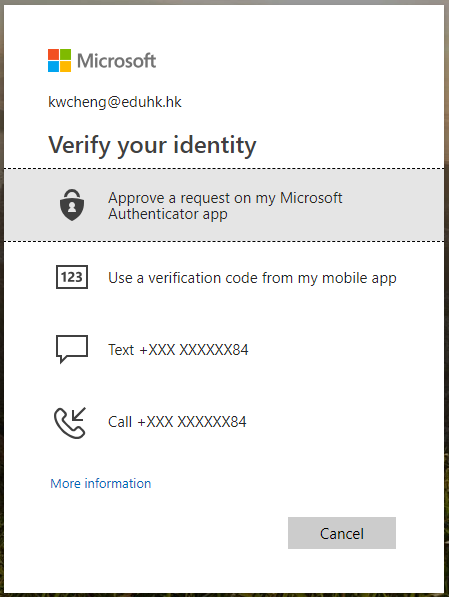
Using the Microsoft Authenticator app on your mobile device as a security token is the most convenient way to complete verification. You can also receive a text message or phone call on your mobile phone to verify your identity. Below are the four verification methods:
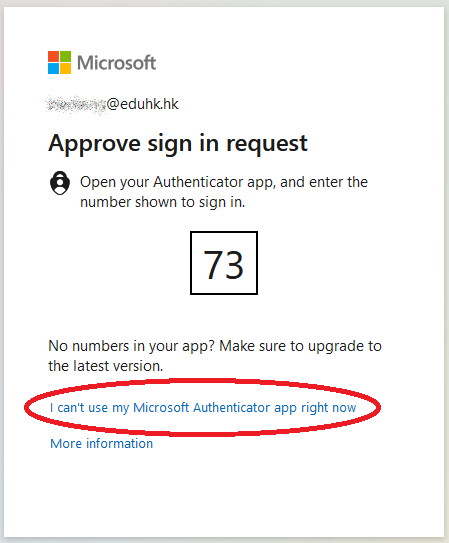
When you sign in to your account, you can choose the verification method on the identity verification page. Click the link " I can't use my Microsoft Authentication app right now". Then choose the verification method you preferred
Verification Methods
| Verification Method | Description |
|---|---|
 App notification App notification (Recommended) |
Using the Microsoft Authenticator app to receive notification Open embedded content on the original website (If you cannot view the video, please click here to open the video.)
|
 Verification code
 |
Users can retrieve the verification code generated with the Microsoft Authenticator app even when there is no Internet connection. The code is renewed every 30 seconds. Using the Microsoft Authenticator app to retrieve verification code Open embedded content on the original website (If you cannot view the video, please click here to open the video.)
|
 Text message
 |
Verifying identity with a text message (SMS)
Open embedded content on the original website (If you cannot view the video, please click here to open the video.)
|
 Phone call
 |
Verifying identity by phone call Open embedded content on the original website (If you cannot view the video, please click here to open the video.)
|